Sublimation Printing Machines: Explore Overview, Basics, Explanation, Knowledge, and Key Details
Digital printing has changed how designs are transferred onto fabrics, promotional materials, and customised products. One widely used method is dye sublimation printing, which uses specially formulated inks, transfer paper, heat, and pressure to create detailed images on suitable materials.
A sublimation printing machine is a digital printer designed to print with sublimation ink. Depending on its configuration, it may be used for small customised products, garments, sportswear, textile rolls, banners, and large-format graphics.
Modern systems include desktop printers, a wide format sublimation printer, a textile sublimation printing machine, and an industrial roll to roll sublimation printer. These machines differ in print width, ink delivery, media handling, production capacity, and compatibility with heat-transfer equipment.
This guide explains how sublimation printing works, the main machine types, important components, applications, selection factors, recent developments, and relevant considerations for users in India.
1. What Is a Sublimation Printing Machine?
A sublimation printing machine is a digital printing system that uses heat-activated dye sublimation ink to transfer designs onto polyester fabrics or specially polymer-coated surfaces.
In a common transfer-based process, the printer first produces an image on special transfer paper. The printed paper is then placed against the receiving material and exposed to controlled heat and pressure. The dye penetrates the polyester fibres or polymer coating, producing the final image.
Unlike conventional surface printing, the transferred dye becomes integrated into the suitable receiving material. This can produce smooth, detailed prints without a thick ink layer on top.
A complete sublimation printing setup may include:
Digital sublimation printer
Sublimation ink
Special transfer paper
Heat press or calendar press
Computer and graphic design software
RIP software and colour profiles
Fabric or polymer-coated receiving material
The printer creates the design, while the heat-transfer equipment completes the process.
2. How Sublimation Printing Works
The sublimation printing process generally involves printing, transferring, heating, and cooling.
Design preparation: Artwork is created using graphic design software and prepared according to the dimensions of the final product.
Colour management: The design is adjusted using suitable colour profiles and RIP software.
Printing: The digital printer deposits sublimation ink onto transfer paper. The design is commonly printed in a mirrored orientation.
Positioning: The printed paper is aligned with the polyester fabric or polymer-coated object.
Heat transfer: A heat press or calendar press applies controlled temperature, pressure, and dwell time.
Dye transfer: Heat activates the dye, allowing it to penetrate the receiving material.
Cooling and removal: The transfer paper is removed after the process, leaving the printed design on the material.
Temperature, pressure, and processing time depend on the ink, paper, fabric, coating, and equipment. Operators should follow the relevant material and machine specifications rather than using one setting for every substrate.
3. Main Components of a Sublimation Printing Machine
Component | Function |
|---|---|
Printhead | Deposits controlled ink droplets onto transfer paper |
Ink delivery system | Supplies sublimation ink to the printhead |
Paper feeding mechanism | Moves transfer paper through the printer |
Media rollers | Maintain alignment and consistent paper movement |
Control panel | Provides machine settings and operating information |
RIP software | Processes artwork and manages print settings |
Colour management system | Helps maintain consistent colour reproduction |
Take-up unit | Collects printed paper rolls in roll-fed systems |
Maintenance system | Supports nozzle cleaning and printhead upkeep |
The printhead is particularly important because nozzle condition and droplet control influence image detail, colour consistency, and print quality. Many inkjet sublimation systems use piezoelectric printhead technology to eject controlled ink droplets.
4. Types of Sublimation Printing Machines
Sublimation printers are available in different configurations depending on the material, print dimensions, and production requirements.
4.1 Desktop Sublimation Printers
Desktop models are compact systems used for smaller printing tasks. They are suitable for customised garments, small fabric panels, promotional items, and polymer-coated products.
They generally have narrower print widths and lower production capacity than industrial systems.
4.2 Wide Format Sublimation Printer
A wide format sublimation printer handles larger print dimensions than standard desktop models. It is used for fabric graphics, display materials, banners, sportswear panels, and other large designs.
Typical characteristics include:
Wide media support
Roll-fed paper handling
High-resolution printing options
RIP software compatibility
Multiple ink configurations, depending on the model
Print width and speed vary by machine configuration.
4.3 Textile Sublimation Printing Machine
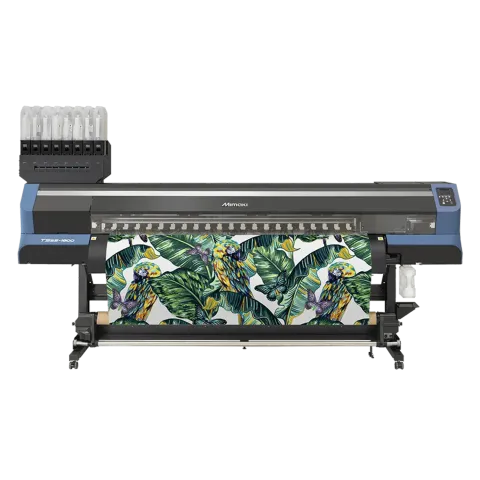
A textile sublimation printing machine is designed for printing textile patterns and graphics, particularly on polyester-based fabrics.
It is commonly used for sportswear, fashion garments, decorative textiles, flags, and soft signage. Some systems print onto transfer paper, while direct-to-textile configurations print onto prepared fabric before heat fixation.
4.4 Roll to Roll Sublimation Printer
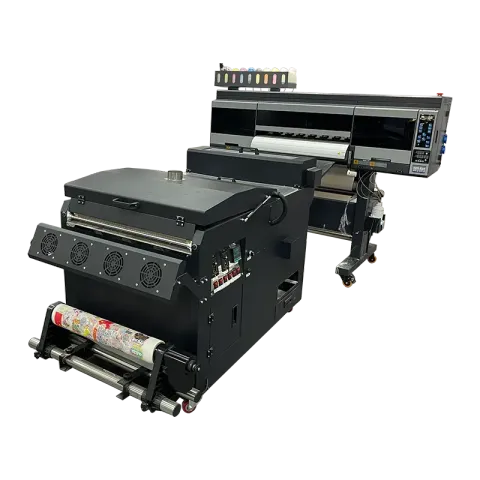
A roll to roll sublimation printer uses continuous rolls of transfer paper instead of individual sheets. The material moves through the printer using feeding and take-up mechanisms.
This configuration is useful for repeated patterns, long textile designs, banners, and larger production runs.
A separate calendar press is commonly used to transfer printed designs onto fabric rolls.
4.5 Large Format Sublimation Printer
A large format sublimation printer is intended for producing oversized graphics and textile designs. It may support wide media rolls and multiple printhead configurations.
Applications include exhibition graphics, fabric displays, large banners, and decorative textile panels.
4.6 Digital Dye Sublimation Printer
A digital dye sublimation printer uses computer-controlled printing technology to produce images from digital artwork. It offers flexibility for changing designs without preparing physical printing screens for each new image.
It may be available in compact, wide-format, or industrial configurations.
4.7 Industrial Sublimation Printing Machine
An industrial sublimation printing machine is designed for sustained production environments. It may include multiple printheads, bulk ink delivery, automatic media handling, advanced RIP workflows, and integration with industrial heat-transfer equipment.
These systems are used where consistent output, continuous operation, and larger production volumes are important.
5. Materials Used in Sublimation Printing
Sublimation printing works best with polyester textiles and surfaces that have a suitable polymer coating.
Material | Suitability | Common applications |
|---|---|---|
Polyester fabric | Excellent | Sportswear, flags, garments |
Polyester-blend fabric | Depends on polyester content | Clothing and textile products |
Polymer-coated metal | Suitable with compatible coating | Decorative panels and promotional items |
Polymer-coated ceramic | Suitable with compatible coating | Mugs and decorative tiles |
Polymer-coated glass | Depends on coating | Decorative products |
Uncoated cotton | Generally unsuitable | Not recommended for conventional sublimation |
For fabric printing, higher polyester content generally supports stronger colour transfer. Blended fabrics may produce lighter results because the dye does not bond to natural fibres in the same way.
6. Important Technologies and Features
Printhead Technology
Printheads control the size and placement of ink droplets. Their design, nozzle arrangement, and firing capability influence resolution, print speed, and consistency.
Colour Management and RIP Software
Raster Image Processor (RIP) software converts digital artwork into instructions for the printer. It can manage:
Colour profiles
Ink limits
Print resolution
Image scaling
Mirroring
Repeating patterns
Media settings
Correct colour profiling is important because colours on transfer paper may look different from the final transferred design.
Automatic Media Handling
Industrial printers may include automatic feeding and take-up systems. These features help maintain paper alignment and manage continuous roll printing.
Heat Transfer Technology
Heat presses and calendar presses apply controlled heat and pressure. Flat presses are suitable for individual products or cut fabric pieces, while calendar presses support continuous roll-to-roll textile production.
Ink Delivery Systems
Some machines use cartridges, while larger systems may have bulk ink tanks and automated ink supply. The configuration affects ink management and maintenance requirements.
7. Applications of Sublimation Printing Machines
Sublimation technology is used across several industries because it supports detailed, colourful designs on compatible materials.
Industry | Applications |
|---|---|
Textile and apparel | Sportswear, T-shirts, leggings, uniforms |
Home furnishings | Curtains, cushions, decorative fabric |
Advertising and displays | Flags, banners, exhibition graphics |
Personalised products | Mugs, coated panels, customised gifts |
Interior decoration | Decorative textiles and coated surfaces |
Sports equipment | Polyester-based teamwear and accessories |
Fashion production | Printed patterns, scarves, and fabric panels |
The choice of printer depends on the material dimensions, design complexity, expected output, and available transfer equipment.
8. Advantages and Limitations
Advantages
Detailed images: Supports photographs, gradients, and complex designs.
Durable textile prints: Suitable transfers become integrated with polyester fibres rather than forming a thick surface layer.
Flexible design changes: Digital artwork can be changed without preparing a new physical screen.
Large design capability: Wide-format systems can print long and oversized graphics.
Suitable for customised production: Different designs can be produced within the same workflow.
Light fabric feel: Properly transferred designs do not generally create a thick printed layer on the textile.
Limitations
Material restrictions: Conventional sublimation works best on polyester or polymer-coated surfaces.
Heat-transfer requirement: Transfer paper printing usually needs a separate heat press or calendar press.
Colour variation: Incorrect profiles, fabric composition, or transfer settings can affect final colours.
Maintenance requirements: Printheads and ink systems require routine care.
Environmental sensitivity: Temperature, humidity, and paper storage can influence print consistency.
Equipment coordination: Printer output and heat-transfer capacity must be balanced to avoid production delays.
9. Factors to Consider When Selecting a Sublimation Printer
Choosing the right machine involves evaluating the complete printing workflow rather than looking only at print speed.
Print width: Match the maximum print width to the size of the fabric or product.
Production volume: Select a configuration suitable for expected daily or monthly output.
Printhead configuration: Compare nozzle technology, available printheads, resolution, and maintenance requirements.
Ink compatibility: Confirm that the printer supports the intended sublimation ink.
Media handling: Check roll width, roll weight, feeding accuracy, and take-up capacity.
RIP software: Review colour management, pattern repetition, file compatibility, and workflow features.
Heat-transfer equipment: Ensure the press can handle the printer's output and the selected materials.
Operating environment: Follow the manufacturer's requirements for temperature, humidity, ventilation, and electrical supply.
Maintenance access: Review cleaning procedures, spare-part availability, and technical documentation.
Production consistency: Examine sample prints and repeatability under realistic operating conditions.
A wide-format printer may be appropriate for display graphics, while an industrial roll-fed system may be more suitable for continuous textile production.
10. Recent Developments and Trends
Digital sublimation printing continues to develop through improvements in printheads, workflow software, colour management, and media handling.
Higher-Productivity Printhead Configurations
Industrial systems increasingly use multiple printheads and advanced droplet control to support higher output while maintaining image quality. Actual productivity depends on print resolution, pass count, ink configuration, and media settings.
Improved Colour Management
Modern RIP systems offer more detailed control over ink limits, colour profiles, image processing, and repeat patterns. These features help maintain consistent output across different print jobs.
Automated Roll Handling
Automatic feeding and take-up systems help reduce manual media handling in continuous production environments. Some configurations also include tension control and media alignment features.
More Flexible Textile Workflows
Digital textile printing supports shorter design runs and frequent artwork changes. Transfer and direct-to-textile systems give operators different options according to fabric type, production workflow, and fixation requirements.
11. Indian Standards, Environmental Rules, and Safety Considerations
Sublimation printing operations in India should consider applicable factory safety, electrical safety, environmental requirements, and local permissions. Requirements depend on the equipment, materials, production process, and location.
Factory and Workplace Safety
Where applicable, the Factories Act, 1948 and relevant state factory rules provide requirements relating to machinery guarding, electrical installations, workplace conditions, and worker safety.
Important precautions include:
Keep hands away from moving rollers and feed mechanisms.
Use appropriate guarding around rotating and heated components.
Follow electrical grounding and isolation procedures.
Provide adequate ventilation around heat-transfer equipment.
Use suitable protective equipment when handling hot materials.
Train operators in emergency shutdown procedures.
Environmental Considerations
Transfer-based sublimation printing generally uses less process water than conventional textile dyeing and wet-printing operations because the image is transferred using heat rather than an extensive washing process.
However, printing units should still manage ink containers, transfer-paper waste, packaging, cleaning materials, and other production waste appropriately.
The Central Pollution Control Board's textile-industry effluent standards cover specified textile units and processes. Applicability to a particular printing facility depends on its operations and wastewater discharge. Units should check requirements with their relevant State Pollution Control Board or Pollution Control Committee.
Electrical and Heat Safety
Heat presses and calendar presses operate at elevated temperatures. Operators should follow equipment manuals, inspect electrical connections, maintain emergency stops, and avoid operating damaged heating components.
Do not assume that every sublimation printer has the same certification or regulatory requirements. Check the machine's applicable conformity documents and relevant Indian standards before installation.
12. Best Practices for Operating Sublimation Printing Machines
A consistent operating routine can help maintain print quality and equipment reliability.
Check printhead nozzles before production.
Use compatible sublimation ink and transfer paper.
Store paper in a clean, dry environment.
Select colour profiles suitable for the printer, ink, and paper combination.
Check media alignment before starting long print runs.
Mirror designs when required by the transfer process.
Follow recommended heat, pressure, and dwell-time settings.
Test the transfer on a sample before larger production runs.
Inspect printed material for banding, colour shifts, and uneven transfer.
Clean and maintain the machine according to its manual.
Keep records of ink batches, print settings, and maintenance activities.
Maintain appropriate ventilation and safe operating conditions.
13. Tools and Resources for Learning Sublimation Printing
The following resources provide technical information about printers, digital textile printing, and environmental considerations.
Resource | Main purpose |
|---|---|
Digital printing technologies and sublimation guidance | |
Textile printers and dye sublimation technology | |
Wide-format printing systems and technical information | |
Artwork preparation and image editing | |
Vector artwork and graphic design | |
Environmental standards and guidance | |
Indian standards and conformity information |
14. Frequently Asked Questions
1. What is a sublimation printing machine used for?
A sublimation printing machine is used to print designs onto transfer paper or compatible textile materials. The designs are transferred using heat and pressure, commonly for polyester garments, sportswear, banners, flags, and polymer-coated products.
2. What is the difference between a wide format sublimation printer and a desktop printer?
A wide format sublimation printer supports larger media widths and is suitable for large textile designs, banners, and display graphics. A desktop printer is generally designed for smaller prints and lower production volumes.
3. What materials can a textile sublimation printing machine print on?
It works best with polyester fabrics and suitable polyester-based blends. It can also be used on compatible polymer-coated surfaces such as coated metal, ceramic, and glass.
4. How does a roll to roll sublimation printer work?
A roll to roll sublimation printer feeds transfer paper continuously from an input roll through the printing system and collects the printed paper on a take-up roll. The printed design is subsequently transferred to compatible fabric using a calendar press.
5. What is an industrial sublimation printing machine?
An industrial sublimation printing machine is designed for higher-volume production. It may include multiple printheads, bulk ink delivery, automated roll handling, advanced RIP software, and integration with industrial heat-transfer equipment.
Conclusion
Sublimation printing machines play an important role in digital textile printing, customised products, promotional graphics, and fabric decoration. Their ability to produce detailed designs on polyester and polymer-coated materials makes them useful across several industries.
From compact printers to a wide format sublimation printer and an industrial roll to roll sublimation printer, different configurations support different production requirements. Choosing the appropriate system involves evaluating print width, printhead technology, ink compatibility, colour management, media handling, and heat-transfer capacity.
With correct material selection, suitable operating settings, routine maintenance, and attention to workplace safety, sublimation printing technology can support consistent and organised digital printing workflows.
Disclaimer: This article is intended for general informational and educational purposes only. Machine specifications, operating procedures, and applicable regulations may vary by model, material, and location. Consult manufacturer documentation and qualified technical professionals before operating or installing equipment. No results are guaranteed, and this article is not intended to sell or promote any particular product, brand, or organisation.

Related Post...
PPC Automation Tools: Complete Guide to Basics, Technologies, Strategies, Facts, and Best Practices
Updated: November 23, 2026
Read More
Sachet Packing Machines: Discover Information, Facts, Tips, Resources, and Expert Advice
Updated: November 23, 2026
Read More